

What Is the myChevrolet® Mobile App?
The myChevrolet® app connects your smartphone directly to your Trax, allowing you to control and monitor key functions remotely. It’s available for both iPhone and Android, and it’s free to download from the App Store or Google Play.
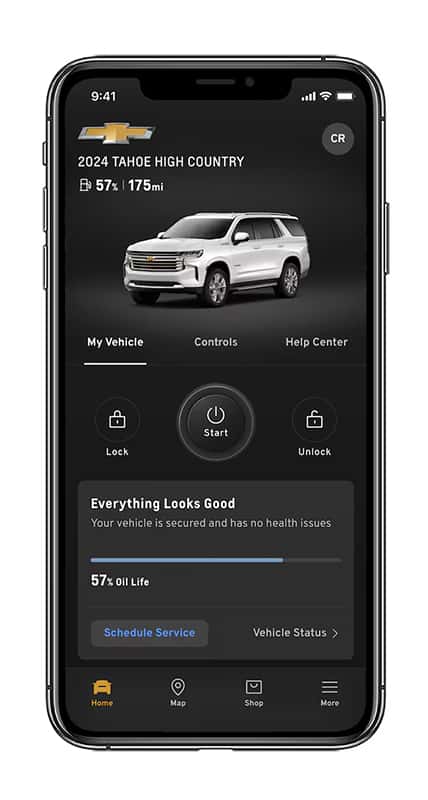 With just a few taps, you can:
-
🚗 Start or stop your vehicle remotely
-
🔐 Lock and unlock your doors
-
📍 Locate your Trax on a map
-
🧾 View vehicle health reports
-
🛠️ Schedule service appointments directly with Craig Smith Chevrolet
How to Set Up the myChevrolet® App
-
Download the myChevrolet® app on your smartphone.
-
Sign in using your Chevrolet Owner Center or OnStar® account.
-
Add your vehicle by entering your VIN (found on your dashboard or registration).
-
Once linked, you’ll instantly see your Trax’s current status and available remote features.
Popular Features You’ll Love
1. Remote Start:
Perfect for Ohio’s cold mornings! Start your Trax from your phone to warm it up before heading out.
2. Vehicle Status:
Check oil life, tire pressure, fuel range, and more — right from your pocket.
3. Parked Vehicle Locator:
Can’t remember where you parked at the mall? Open the app and see your Trax’s location instantly.
4. Service Scheduling:
Need an oil change or tire rotation? Schedule directly through the app with Craig Smith Chevrolet’s Service Center.
Pro Tip: Enable Notifications
Turn on push notifications to get instant alerts about maintenance reminders, recalls, and more — helping you stay on top of your vehicle’s health all year long.
Learn More at Craig Smith Chevrolet
If you’re new to the myChevrolet® app, our team at Craig Smith Chevrolet can help you set it up during your next visit. We’ll walk you through every feature, show you how to connect it to your Trax, and answer any questions you have.
📍 Stop by our showroom in Galion, Ohio, or call to schedule a Tech How-To session with one of our product specialists.

0 comment(s) so far on What Is the myChevrolet® Mobile App?