


What Is Wireless Apple CarPlay®?
Wireless Apple CarPlay® connects your iPhone to your Trax without the need for a USB cable. Once paired, it automatically syncs every time you get in the vehicle, letting you use your favorite apps right from the infotainment screen.
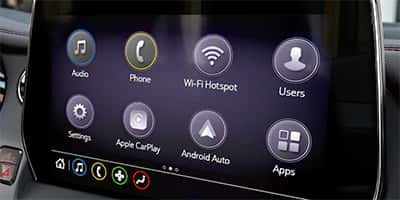 With it, you can:
-
Use Apple Maps, Google Maps, or Waze for navigation.
-
Access messages, calls, and music safely through voice control.
-
Get hands-free help from Siri while keeping your focus on the road.
No cords. No distractions. Just a seamless connection between your Trax and your iPhone.
How to Set It Up in Your Chevy Trax
-
Start Your Vehicle and make sure Bluetooth and Wi-Fi are both turned on.
-
On your iPhone, go to Settings → General → CarPlay → Available Cars.
-
Choose “Chevy Trax” when it appears.
-
Follow the prompts on your infotainment screen to complete the pairing.
Once connected, your phone will automatically pair every time you start your Trax—no cables needed.
Pro Tips for a Perfect Connection
-
Keep your iPhone updated. Software updates often include CarPlay improvements.
-
Only pair one phone at a time. Multiple phones can cause connection conflicts.
-
If CarPlay doesn’t appear: Restart your phone and turn your vehicle off and on again.
At Craig Smith Chevrolet, our team can walk you through setup in minutes during your next service visit or test drive.
Why Drivers Love It
Wireless Apple CarPlay® transforms your drive by combining Chevy innovation with Apple simplicity. Whether you’re taking a quick trip around Galion or heading out for a weekend adventure, it keeps your favorite features close—and your hands free.
Learn More at Craig Smith Chevrolet
Want to see Wireless Apple CarPlay® in action? Visit Craig Smith Chevrolet in Galion, Ohio, and our product experts will demonstrate how to connect, customize, and maximize your Trax technology.
We’re not just here to sell you a vehicle—we’re here to help you love every feature in it.

0 comment(s) so far on What Is Wireless Apple CarPlay®?